I am often asked how and why my library is using web 2.0. My reasons are a little different than some. My main reason for using web 2.0 technologies is that they enable me to do cool things for free or almost free! This series will explain how I am doing that step by step.
Today I want to talk about how we are using Del.icio.us and FeedDigest and Delicious JSON Feeds as a "content management system" for our webpage.
Background: Our website consists of 136 static webpages. We have a "eJournals" page with an alphabetical list of our subscribed journals and 12 additional pages for "eJournals by subject." This same model is used for Databases, and individual subject guides. Imagine if you will a time when we cancel a subscription. I have to manually (I use Dreamweaver) remove that link on several different pages. It is easy to make a mistake and degrade the integrity of the whole website. This is un-searchable. All these pages are static lists.
The situation would be wonderfully solved through the purchase of a nice database-driven content management system right? Ok, now picture a situation where (a) there is very, very little money and (b) staff is at a minimum - one person per "department". Costly or time consuming solutions (like a sys admin for a content management system) are not possible.
Enter web 2.0. We decided to use Del.icio.us, everyone's favorite social bookmarking site, to manage our electronic resources. Sounds too simple right? Delicious is for personal "favs," right? Well what is an electronic resource really?
An Electronic Resource consists of:
- A name
- A URL
- A description
- Dates of coverage
- Publisher
- Access type (subscription or open access?)
- Subject coverage
There are other ways to describe an electronic resource covered in much detail in the MARC record, of course. However, no one uses the catalog. No one. Seriously. People don't want to search a catalog - and if they for some reason do...it is to look for a book. I know there are differing opinions on making the catalog The Resource Location, and some of them very good. I welcome comments below. I am personally of the opinion that if a catalog doesn't function exactly like Google - no better yet in Google - then we are wasting our breath. That argument aside, I believe that the breakdown above captures the essential description of an electronic resource from a patron perspective (of course I'm still looking for a staff-side ERMS solution that is free :) ).
So we bookmarked our electronic resources in Delicious and added tags corresponding to 4 pre-determined bundles. "Bundles" in Delicious are ways of grouping tags...for us MLISers that means they are facets that our subject terms are arranged in to increase browsability. Our bundles:
- Browse_*Subject* - your average subject categorization - we loosely use the NASA Thesaurus although we aren't slaves to it since tagging allows an unlimited amount of subjects per item unlike MARC. Delicious uses a space to seperate terms, hence the '_' and we wanted Subject to be the first facet or bundle in alphabetical order so we added the '**' to force that.
- Browse_Access - This is where we say if it is subscription (and thus only NASA can view it) or OpenAccess and Full-text. We originally had full-text, bibliographic, bib+abstract, etc. We decided to drop this since from a patron perspective it is either full-text or not. We can use the description (below) for more detail if necessary.
- Browse_Type - This is the format of the resource: Journal, Database, ProfOrg, etc. as well as content types: Image, Map, PDF, etc.
- Browse_Affiliation - This allows us to include "publisher" if important as well as other relevant affiliation information. What I mean by this is we continued to see this from a user perspective. Patrons don't get "Elsevier" this means nothing to them. At the same time, due to where we are, an affiliation like "ConstellationProj" has much relevance. It was continually difficult not to slip into using this for OUR benefit. We had to be vigilant to make this a patron-focused tagging.
Besides the facets (bundles) and tags we also had the Title and Description in Delicious to utilize. We used the Title for both the name of the resource and the coverage, if applicable, and the description for a simple "what is it" and/or access guidelines if needed. So, for example one of our Journal entries looks like this:
-
We also used the dummy tag "NEW" so that each bookmark would be reviewed at a higher level before the NEW tag was removed. We haven't went live with this yet so this method worked. In the future we can use NEW for a designated period of time to sort our resources by "What's New" which will be nice for an RSS feed.
When all is said and done we can sort our list by "Journal" and see all the eJournals we subscribe to (plus some OA) on Delicious. Here is our list (in progress).
Ok, that is the basic strategy we used to organize our resources via Delicious. Now what?
Now we wanted to integrate this information into our website. (We will use Delicious as a resource in and of itself but that will take some promotion and education to our user base so we are putting that in a phase 2.) We use two methods to do this:
- Delicious RSS + FeedDigest - Delicious is wonderful enough to provide an RSS feed for nearly every page of your Delicious account. So, when I visit http://del.icio.us/glennlibrary/Journal I can get an RSS feed for this at the bottom of the page. This needs some processing:
- You could load this feed directly onto your page; however, it is a little limiting in layout and it will not default to alpha sort. To give us more control we use FeedDigest. FeedDigest is a great service for aggregating and publishing RSS feeds from several other fields. We have used this on our website for some time to combine feeds from several different journals in a feed and provide it as a "What's New in " feed. These customized news feeds have been hugely popular. In this case we are using FeedDigest for the control it allows. Check out FeedDigest for more information it is definitely worth its modest annual price.
- FeedDigest provides several types of code - we go with javascript that looks like this :

- Now each time someone visits our webpage the page will query FeedDigest which will in turn query Delicious for any changes made to our Journal entries. When a journal is canceled we need only remove it from Delicious and voila!
- Delicious JSON - To handle subject sorting we use Delicious a little more apparently (the above use is completely transparent - no one would even know you are using Delicious unless you tell them). Delicious has JSON feeds - learn more about Delicious and JSON here.
- Delicious gives you the code below for your tags. We tweaked the code to show only Journals by adding /Journal to the JSON string and to the output script. The final script is:

- Embedding this code in our webpage creates a subject browse feature that takes users right to Delicious.
Here is a screenshot of our results:

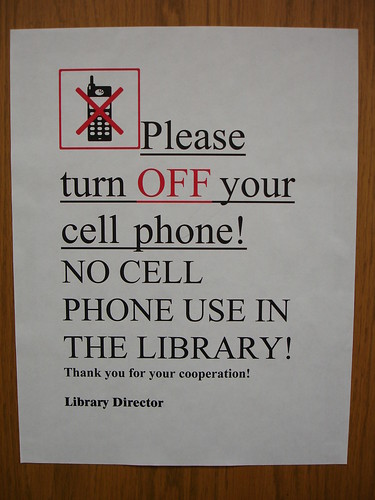
There is an interesting group on flickr that is collecting Library Signage. (btw, we need to compile a list of often used library words that word processing programs think are spelled wrong - to get started: browsable, findability, signage...). Look through some of them and wonder if your local retail establishment would hang them. We have a tendency to TALK IN ALL CAPS, use strong words like NEVER, NOT, and UNDER NO CIRCUMSTANCES. We like to underline things and use red - the quintessential color of "thou shalt not."
For example, in my library we had many DO NOT RESHELVE (also considered misspelled) signs. Now here is a sign with a purpose - we want to count what was used, we want to put it back where it goes, and we don't want to burden you, our lovely patron, with the task. But, "DO NOT RESHELVE" is the best way we could find to say that??
Where are our please and thank you and this is your collection not mine. Do we sometimes act as if it is our collection and that patrons are "messing it up"? I can admit to feeling this way sometimes. What would happen if we flipped this idea on its head? The collection belongs to the patrons - we are only stewards of it and our stewardship should never restrict or encumber the use of the information.
Please allow us to reshelve your journals
There is an interesting group on flickr that is collecting Library Signage. (btw, we need to compile a list of often used library words that word processing programs think are spelled wrong - to get started: browsable, findability, signage...). Look through some of them and wonder if your local retail establishment would hang them. We have a tendency to TALK IN ALL CAPS, use strong words like NEVER, NOT, and UNDER NO CIRCUMSTANCES. We like to underline things and use red - the quintessential color of "thou shalt not."
For example, in my library we had many DO NOT RESHELVE (also considered misspelled) signs. Now here is a sign with a purpose - we want to count what was used, we want to put it back where it goes, and we don't want to burden you, our lovely patron, with the task. But, "DO NOT RESHELVE" is the best way we could find to say that??
Where are our please and thank you and this is your collection not mine. Do we sometimes act as if it is our collection and that patrons are "messing it up"? I can admit to feeling this way sometimes. What would happen if we flipped this idea on its head? The collection belongs to the patrons - we are only stewards of it and our stewardship should never restrict or encumber the use of the information.
Please allow us to reshelve your journals
Have you ever had the "database" argument with a fellow library co-worker? You know the one where you want to put Science Direct on the database links and they say "but that is a collection of ejournals, not a database!"?
I was heartened to find I'm not the only one beating my head against this brick wall from time to time Library 2.0: An Academic's perspective had a wonderful story about her fight to put Google Scholar on the proxy list at her school. One of the arguments here was that Google Scholar was a "search engine" and not a database.
Really??
So what is a database? Google (gasp! she used Google!) has a varied list of definitions for the word database. I like the simplicity of WordNet's definition: An organized body of information. Simple. All encompassing. By this definition my bookshelf is a database. hmmm.
Ok, let's try again. Alt web's definition is : A computerized collection of information. Ok, so my bookshelf is not a database. But my email inbox is?
Ok, one more time. The Wildlife Society remote sensing working group defines a database as: Relational data structure used to store, query, and retrieve information. Ah, much more technical. A computer scientist would like the definition. Here we have another piece of the equation - store? query? retrieve? Suddenly this organized body of information has meaning.
I guess my working definition of a database would be: a computerized collection of information that is organized in a way that bring meaning to the collection and is able to be manipulated for use.
Working in different libraries I have seen many unsaid definitions of database in action:
- A database is something subscribed not free
- A database has vocabulary control
- A database has bibliographic records
- etc.
All of these seem to me to be attempts for libraries to control the data and information. To put reins on it and keep it in check. Are we afraid if we "let" them use a "non-librarian approved" database that they won't respect us in the morning?
I guess it comes down to what a library feels its mission is. Is your mission to teach and proscribe that information must come from these sources? Only your sources are accurate and right and we will snub our noses at those unwashed masses of other sources. Or, is your mission to help people find and use information. period. People - in all their messy preferences and quirks. Information - in all its messy and unorganized and uncontrolled beauty. And bring the two together - wherever, whenever.
If our patrons want to use google scholar or science direct or whatever - what do we gain by scolding them? Obsolescence.
I think we fear obsolescence and that in our fear we are realizing just that. If they use google scholar - what will our jobs be? I say, don't worry! They don't use google scholar well, trust me. They need help and guidance and alternatives at their fingertips when they grow tired of trudging through. And a librarian will be there to pick up the pieces.
I was recently at a meeting where a discussion of inclusion of 3rd party content in an information resource arose as a topic. The specific topic centered around 3rd party content hosted along side search results in a research database but this brings up and interesting disconnect that I have encountered here at my Library. That is: what responsibility do librarians have to the validity of 3rd party content?
One camp sits firmly in the "if it isn't properly vetted it doesn't belong anywhere near authoritative sources." I recently ran into this on a news feed I include on my library's webpage (homepage no less). I have an aggregator troll the web for news about my organization and use Feedigest to display the results. And, by web, I mean that whole, huge, messy thing called the World Wide Web. This content is hardly vetted! The concerns came when we recently had a news item involving the TV reality show Beauty and the Geek. Panic! There is non-technical, markedly non-relevant material right on the LIBRARY HOMEPAGE! *faint* This camp believes in information beauty - and beautiful information is authoritative, relevant, and (usually) paid for.
The other camp (of which I tend to spend a night or two) believes that information only has value when assessed by the reader and it can not be held back by the strictures of "relevance" or "authority." After all, one person's irrelevant is another person's eureka! moment. Information must be free! "You can't stop the signal!" ($5 if you can name that movie!). This camp is the Geek camp - maybe including, but not limited to, "millennials" that have grown up downloading free music and getting their news from blogs.
I think there is an important middle ground with valuable opportunities for Librarians. The "Beauty" camp is missing the forest for the trees - end-users are already going elsewhere to get their information! They are going to Google and Yahoo and The Onion. They are deciding for themselves what is relevant and authoritative. Are they doing this well? Perhaps not. But they ARE doing it. Ignoring that fact and being information "purists" is counterintuitive. The "Geeks" aren't getting it right either. One of the value-added services librarians provide are filtering of information noise and some level of validation of authority. This is not a role to be taken lightly in an ever pouring deluge of information assaulting our patrons.
Wherever shall the twain meet?
I think there are two ways that librarians can utilize 3rd party content without abandoning Beauty for the Geek.
- Notification of content types. There are several, evermore obvious ways to delineate your content. In my library we differentiate between subscribed and unsubscribed content and there are several ways to do this.
- Post a content policy on your page. Of course, like a EULA, no one will ever read it but at least it is there.
- On my library website we use a small icon to designate subscribed and non-subscribed content. This is minimally intrusive. On included RSS feeds the news service usually includes a "brought to you by..." branding.
- Another method is to separate content by chunking subscribed separate from unsubscribed content on a page or even on separate pages. I do not like this method because information is information to the patron - they don't care how we acquired it.
- The most intrusive method would be a middle-page that a patron hits before proceeding that informs them they are about to view a page that has not been reviewed. This method can be annoying from a usability perspective and I am not a fan of this. Ultimately it will depend on the sensitivity of the user community.
- Vetting the source. This is the most obvious one to me. If I have put it on our library webpage then I have vetted it to some extent. I might not be able to screen every news item but I do generally trust Yahoo! as a news source and I have created a search string that I believe will minimize noise and maximize relevance. For example, I have an included RSS feed on my Nanotechnology subject guide that searches Yahoo! news for the following string: Yahoo! News search results for [nanotechnology OR nano-technology OR Nano* -apple -ipod]. As far as I'm concerned this is a vetted resource. Using Feedigest I can also mash this news feed with news from nanotechnology.com and nanotech-now.com to create a single consolidated source for my patrons. If I one day get a news item about a reality show because one of the contestants once bombed a nanotech firm - then cest la vie! This is still less noise than my patron typing "nano" into Google.
So is it worth it?
I think that the benefits of this type of content are worthwhile. With integration of additional content your library site can be:
- Be the one-stop information source for your patrons
- Save them time in sorting their own results
- Provide real-time, value-added information
So, Beauties don't throw out this juicy content! Geeks don't drown us in free information! Get together - hold hands - it is a beautiful geektastic thing.
Publications:
Sample Book Review:
Adaptive Array Systems: Fundamentals and applications
Review by: Paige C. Lucas-Stannard, Librarian NASA Glenn Research Center
Conventional signal array systems provided an advantage over single sensor recievers by compensating for beam width limitations and directivity issues. Signal arrays are used in radar, sonar, seismic, biomedical and communications systems. However, these signal array systems are susceptible to their own range of problems presented by unstable array environments. Using statistical detection and estimation theory to automatically respond to a changing array environment is the lure of adaptive array systems discussed in Adaptive Array Systems: Fundamentals and applications.
Authors Ben Allen and Mohammed Ghavami of the Center for Telecommunications Research at King's College in London present this look at array signal processing and its applications. Ghavami has previously written Ultra Wideband Signals and Systems in Communication Engineering and both authors are involved in smart antenna technologies for wireless communications.
The first four chapters provide a thorough background into antenna array systems and array signal processing. Chapter one includes detailed mathematical concepts in electrodynamics and terminology of antenna technology. This chapter is detailed enough for a undergraduate-level newcomer to antenna technology given a background in engineering mathematics. Chapters 2-4 build upon this foundation to address issues in Narrowband Array Systems (chapter 2), Wideband Array Processing (chapter 3), and Adaptive Arrays (chapter 4). These four chapters provide a thorough study of the principles and algorithms of the topic appropriate for senior-level undergraduate, graduate students or as a reference for the researcher/practicioner.
The fifth chapter takes the science detailed in chapters 1-4 and applies them to a more real-world scenario of a mobile communications system where operating environments and components are inconsistent and introduce their own imperfections. With sections on signal processing constraints, system calibration challenges, and spatial propagation parameters this chapter provides techniques to overcome common challenges in antenna array implementation and will be valuable to students and practicing systems designers.
The final chapter discusses applications of adaptive array technology in biomedical, radar, sonar, and terrestrial and space communications systems through a series of case studies.
Each chapter ends with a set of questions and problems including both mathematical and conceptual questions. The book includes a variety of black and white charts and graphs throughout the text to demonstrate concepts. Mathematical equations and derivations are also heavily featured. A detailed table of contents and index as well as a reference section adds to the usability of the book. These features greatly enhance the text and make the topic more accessible.
There are many books available dealing with antenna technology and specifically adaptive arrays. For example, Adaptive Antenna Arrays: Trends and Applicaitons (Springer, 2004) and Introduction to Adaptive Arrays (SciTech Publishing, 2003) both provide an introduction to the topic. Other books cover specific applications of the technology such as, Adaptive Array Measurements in Communications (Artech House Publishers, 2001) and Advanced Array Systems, Applications and RF Technologies: Signal Processing and its Applications (Academic Press, 2000). Allen and Ghavami's book is unique in its inclusion of both an academic look at the fundamentals of adaptive antenna technology paired with practical applications and relevant case studies that cross different fields of applications. This makes the book valuable to a wider audience.
This book is recommended for libraries serving undergraduate and graduate students as well as research libraries and libraries serving engineering professionals working in communications, radar, sonar, and biomedical fields.
Technical Information Specialist
NASA Glenn Research Center Science and Engineering Library, Cleveland, OH - 2004 - present
- At NASA I serve as a member of the NASA Information Services Alliance (NISA) for which I just finished a two year appointment as Chair. During my tenure we launched the NASA Digital Library (nasa only) and NASA Ask-a-Librarian (nasa only) virtual reference service including an implementation of Google for internal NASA search.
- I am also a member of the NASA Agency-wide Knowledge Management Working Group and an author at the OpenNASA blog.
- I was chosen to represent Glenn Research Center at the Next Generation Exploration Conference in 2006 and was Lead Editor on the Mars Settlement and Society Working Group Proceedings.
- As a contract representative I oversee of Library operations and budget.
- I provide digital content design including webpages and web applications for information dissemination. I also run the library blog Surf the Web Smarter Blog.
- I am in charge of development and delivery of bibliographic instruction for Center researchers and staff. I have taught classes, such as Surf the Web Smarter and write an enewsletter of the same name that offers tips for maximizing online search success while reducing search time.
- Print and electronic Collection Development aimed to serve current research goals and anticipate emerging science trends.
InterLibrary Loan Lending Coordinator
Kent State University Libraries, Kent, OH - 2003-2004
- Conducted usability study for Library website redesign team including user analysis and focus group sessions.
- Supervised student employees and work flow.
- Provided reference service and training to undergraduates, graduates, and faculty.
- Created and maintained database of incoming books for Reference and User Services Quarterly reviews editor.
Library Associate
Stow Munroe Falls Public Library, Stow, OH - 2003
- Won grant monies for recycling and litter prevention education.
- Collection Development in science, specifically hands-on manipulatives.
- Developed and implemented interactive science center curricula and programs.
Circulation Supervisor
Eckerd College Library, St. Petersburg, FL - 2002
- Supervised and trained circulation staff of 22.
- Designed training program for library employees including an interactive online tutorial, and employee manual.
.png)